RDP Multipath for Azure Virtual Desktop: Enhanced Connection Reliability
Microsoft's RDP Multipath for Azure Virtual Desktop addresses persistent connection reliability issues by using multiple network paths and intelligent switching.
Microsoft's just rolled out RDP Multipath for Azure Virtual Desktop, and it's addressing one of those persistent pain points we've all experienced: unreliable remote connections during critical work moments.
What is RDP Multipath?
RDP Multipath improves session stability by continuously monitoring multiple network paths and dynamically selecting the most reliable one. Instead of relying on a single connection, it establishes multiple parallel UDP connections and intelligently switches between them when network conditions change or degrade.
The technology uses Interactive Connectivity Establishment (ICE) to create redundant connections through STUN and TURN protocols, ensuring your Azure Virtual Desktop sessions remain stable even in challenging network environments.
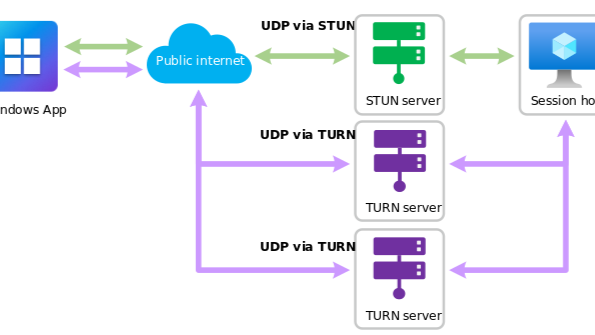
RDP Multipath architecture with multiple UDP paths via STUN and TURN servers
Why Should You Care?
Enhanced Reliability
Even in environments with fluctuating network quality, users can expect a more stable and productive experience. This means fewer dropped connections, reduced session interruptions, and improved user satisfaction.
Zero Configuration Required
RDP Multipath works automatically. You don't need to make changes to existing infrastructure, making it a genuine enhancement rather than another deployment project.
Business Impact
Reduced support tickets, improved productivity, and better user experience for remote and hybrid workers.
How to Enable RDP Multipath in Validation Environments
RDP Multipath is currently being rolled out in phases and is now Generally Available (GA). To test it in your validation environment:
Prerequisites:
- Your host pool must be set as a validation environment
- Ensure that RDP Shortpath is configured as the primary transport protocol
Manual Enablement (Optional):
If you want to enable RDP Multipath ahead of the full rollout:
reg add "HKLM\SYSTEM\CurrentControlSet\Control\Terminal Server\RdpCloudStackSettings" /v SmilesV3ActivationThreshold /t REG_DWORD /d 100 /fVerification:
- Users can check the connection status of a remote session from the connection bar, which shows RDP Multipath is enabled
- Azure Virtual Desktop administrators can view connection reliability information in Azure Virtual Desktop Insights
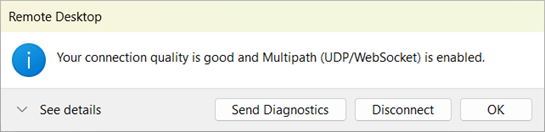
Connection status showing RDP Multipath enabled
Get Started Today
Start testing RDP Multipath in your validation environments today to experience the enhanced connectivity before the full production rollout completes.
Jacob Williams
Azure Cloud Engineer & AVD Specialist at Phoenix Software Limited. Microsoft certified Solutions Architect Expert.